Station 03
Install BepInEx 5 (x64)
Download the right build, extract it beside the executable, run the game once to let it unpack itself, then read the log to confirm it loaded.
Step one of four
Download the right zip§
BepInEx comes from the BepInEx team and from nowhere else. There is no mirror of it on this site, deliberately — a loader should always be taken from the people who build it.
Plugin framework
BepInEx 5.4.23.5
The loader that gets managed code running inside a Unity Mono game. Free, open source, and the framework both Ungodly plugins are built against.
- File
BepInEx_win_x64_5.4.23.5.zip- Flavour
- Windows · x64 · Unity Mono · BepInEx 5
- Extracts to
<game folder>\— the folder with Blasphemous.exe
On the release page the file is under Assets, near the bottom. There are eight files there; you want the one whose name contains win and x64. If you are unsure, the comparison table on station 01 lists every wrong option and what each one does instead.
Unblock it before extracting
Right-click the downloaded zip → Properties → tick Unblock → Apply. Doing it to the archive means every file that comes out is already clean. Full explanation on station 01.
Step two of four
Extract it beside the executable§
This is the step that people get wrong, and it is worth being pedantic about. The contents of the zip go into the game folder. Not the zip. Not a folder named after the zip.
Open the zip and look at what is inside it
At the top level you should see a
BepInExfolder and three loose files:winhttp.dll,doorstop_config.iniand.doorstop_version. If instead you see a single folder with the zip’s own name, open that first — the four items are inside it.Select all four and copy them into the game folder
Drag them into the Explorer window from station 02, or extract the zip directly to that path. Say yes to any merge prompt.
Check that
winhttp.dllis a sibling ofBlasphemous.exeSame folder, same level, side by side in the same file list. This is the whole trick and everything downstream depends on it.
Blasphemous/
├── BepInEx/                                  from the zip
│   ├── core/                                 the loader itself
│   └── patchers/                             empty; leave it
├── Blasphemous_Data/
├── Blasphemous.exe                           unchanged, untouched
├── UnityPlayer.dll
├── winhttp.dll                               the proxy — must sit exactly here
├── doorstop_config.ini                       tells the proxy what to start
└── .doorstop_version
■ you copy this in ■ the game writes this itself ■ already there, leave it alone
The single most common mistake
Ending up with Blasphemous\BepInEx_win_x64_5.4.23.5\BepInEx\ instead of
Blasphemous\BepInEx\. Extracting "here" inside your Downloads folder and then dragging the wrong
level across does this every time. If winhttp.dll is not sitting directly next to
Blasphemous.exe, it is wrong — move things up one level and try again.
Step three of four
Run the game once§
BepInEx ships half-unpacked on purpose: the rest of its folders are created by the loader the first time it actually runs inside the game. So launch Blasphemous now, before you install any plugin.
Launch the game the way you normally do
Through Steam, through GOG Galaxy, or by double-clicking
Blasphemous.exe— all three work identically, because the proxy is loaded by Windows, not by the launcher.Wait for the main menu
Loading may take a few seconds longer than usual this one time while BepInEx builds its assembly cache. The menu will look completely normal. There is no splash screen, no watermark, and no visible sign that anything is different — that is correct.
Quit back to the desktop
Use Exit in the menu rather than killing the process, so the log gets flushed properly.
Now look at the game folder again. Three new folders and a log file have appeared inside BepInEx:
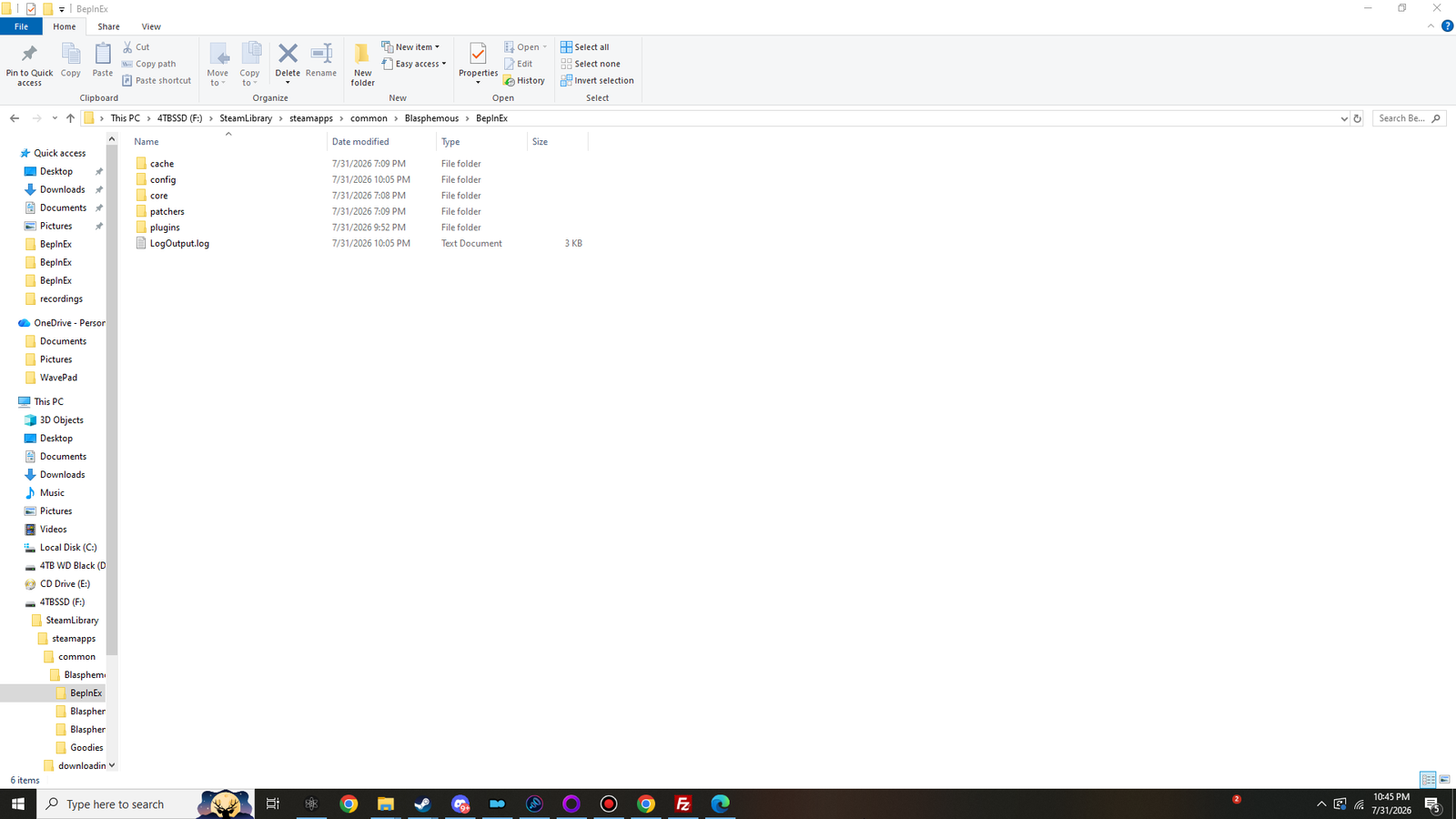
| Folder | Where it came from | What it is for |
|---|---|---|
core | the zip | BepInEx itself, plus HarmonyX — the patching library the plugins use. |
patchers | the zip | Preloader patches. Nothing in this guide uses it; leave it empty. |
cache | the first run | Assembly metadata, so later launches are quicker. Safe to delete at any time; it rebuilds. |
config | the first run | BepInEx.cfg now, plugin configuration files later. |
plugins | the first run | Empty right now. This is where the two DLLs go next. |
LogOutput.log | the first run | A plain text record of the last launch. Your first stop for anything that goes wrong. |
No BepInEx folder appeared?
Stop here and do not install the plugins — they cannot help. Jump to if no BepInEx folder appeared at the bottom of this page.
Step four of four
Read the log§
Open BepInEx\LogOutput.log in Notepad. On a clean, working install it is short — a few kilobytes —
and the top of it says which BepInEx loaded and which Unity it found:
The first lines of a healthy LogOutput.log
[Message:   BepInEx] BepInEx 5.4.23.5 - Blasphemous (…)
[Info   :   BepInEx] Running under Unity v2017.4.40
[Info   :   BepInEx] CLR runtime version: 2.0.50727.1433
[Info   :   BepInEx] Supports SRE: True
[Info   :   BepInEx] System platform: Bits64, Windows
[Message:   BepInEx] Chainloader initialized
[Info   :   BepInEx] 0 plugins to load
- The version line confirms which build actually loaded — not which one you meant to download.
Bits64confirms the 64-bit path. If it saysBits32, you have the x86 zip.Chainloader initializedis the sentence that matters. Everything before it is BepInEx getting itself running; everything after it is plugins.0 plugins to loadis correct right now. The plugins folder is empty. It becomes2 plugins to loadat the end of the next station.
Two lines that look like errors and are not
AccessTools.Property: Could not find property for type UnityEngine.Application and name isBatchMode
— harmless. Application.isBatchMode arrived in Unity 2018.2 and this game is built on
2017.4.40, so HarmonyX probes for it, does not find it, and carries on. It appears
above Chainloader ready, before any plugin exists.
The Action "Submit" does not exist — also harmless, and not from BepInEx at all. That is
Rewired, the game’s own input library, and it shows up on a completely unmodded install.
Nice to have
Optional: turn the console on§
BepInEx can open a second window that streams the same log live while you play. It is genuinely useful when you are tuning settings, and it costs nothing to enable.
Open
BepInEx\config\BepInEx.cfgin Notepad.It only exists after the first launch, which you have now done.
Find the
[Logging.Console]section and setEnabled = true.It ships as
false. That is the only line you need to change.Save the file and launch.
A console window opens alongside the game. Closing it closes the game, so leave it be until you are done.
Turn it back off when you are finished
The console costs a little performance and it takes focus in ways that can be annoying in fullscreen. Both plugins have an in-game diagnostics tab that covers most of what you would want the console for anyway.
Diagnosis
If no BepInEx folder appeared§
Work down this list in order. It is ranked by how often each one turns out to be the answer.
| Check | What to do |
|---|---|
winhttp.dll is not next to Blasphemous.exe | Almost always the answer. The files ended up one folder too deep. Move them up a level so the DLL and the EXE are siblings. |
| You have the x86 zip | A 32-bit proxy silently does nothing in a 64-bit process. Delete winhttp.dll, doorstop_config.ini, .doorstop_version and the BepInEx folder, then extract the x64 zip. |
| You have a BepInEx 6 build | Same removal, then install BepInEx 5. Version 6 does not load BepInEx 5 plugins even when it does load itself. |
| Antivirus removed the proxy | Check your quarantine. If winhttp.dll is in it, restore it and add an exclusion for the game folder. |
| The game is in Program Files | Windows may be blocking writes. Move the game to a folder you own, or to another drive, through your storefront. |
doorstop_config.ini was edited | Its enabled key must be true. If you are not sure, delete all four items and extract the zip again. |
| An overlay is injecting first | Rare, but some capture and overlay tools hook the process early enough to interfere. Close them and try one clean launch. |
When the log says Chainloader initialized
BepInEx is installed and working. Nothing else on this page matters. Move on to the plugins.