Two .rar files. Each holds one DLL and one README, and nothing else — no installer, no
dependencies, no shared runtime to add.
Graphics & UI suite
Ungodly GFX 1.2.0
Raises the 640×360 internal buffer the whole game is drawn into, fixes an interface-scaling bug in the retail build, and opens up the display, quality and post-processing systems the engine keeps closed.
Puts every enemy statistic in the game within reach, then runs a live director over the top that reads six signals from your play and moves the difficulty while you are in the room — and from 1.2.0, remembers where it got to, per save slot.
Both archives are hosted on my own paid Google Drive account. That is a deliberate choice, and it is worth
saying what it buys you:
I control the storage. These are files I compiled and uploaded myself, to an account I pay for. No
third-party file host sits in the middle, so there is no ad gate, no countdown timer, no fake download button and
no bundled "download manager" attached to the file on its way to you.
The link cannot be swapped underneath you. Free re-upload sites go dead, get taken over, or quietly
substitute what is behind a link. This one is answerable to me.
It is usually faster. Drive delivers from Google’s own infrastructure, which is generally quicker
and more reliable than the free mirrors small mods normally end up on.
You can verify what arrived. Both tiles above list the exact byte size and SHA-256 hash. If the file you
downloaded matches, it is the file I published, byte for byte.
Each tile offers three routes to the same archive: Download from my Drive starts the transfer immediately,
Open in Drive shows you the file in Drive first if you would rather look before you click, and
Copy bundled with this guide pulls the archive out of this website’s own files/ folder without
touching the internet at all.
✦Unblock both archives before extracting
Right-click each .rar → Properties → tick Unblock → Apply.
A DLL that still carries the internet marker can be refused silently by the loader, and a silent refusal is
the most annoying kind of problem to chase.
Extract both archives anywhere convenient — your Downloads folder is fine. This is what you get:
File
From
Size
What it is
UngodlyGFX.dll
Ungodly GFX 1.2.0
160.0 KB
The plugin. This is the only file that has to be installed.
README.md
Ungodly GFX 1.2.0
17.2 KB
Full technical write-up: what it changes and why.
UngodlyDifficulty.dll
Ungodly Difficulty 1.2.0
195.5 KB
The plugin. This is the only file that has to be installed.
README.md
Ungodly Difficulty 1.2.0
35.9 KB
Full technical write-up: the director, continuity, the presets, the internals.
Only the two DLLs get installed. The READMEs are the full technical write-ups — worth reading if you want the
reasoning behind any particular setting, and safe to leave where they are.
⁂No configuration file ships in the archives
That is on purpose. Both plugins generate their own configuration file on first launch, complete with every
setting’s legal range and a plain-English description of what it does. A file you shipped alongside a DLL can
drift out of date with it; a file the DLL writes itself cannot.
It was created by the launch you did at the end of station 03 and it
is currently empty. If it is not there, BepInEx has not run yet — go back and launch the game once.
Copy UngodlyGFX.dll and UngodlyDifficulty.dll into it
Loose, side by side, directly in plugins. Do not create a folder for each one, do not
rename them, and do not copy the READMEs in with them.
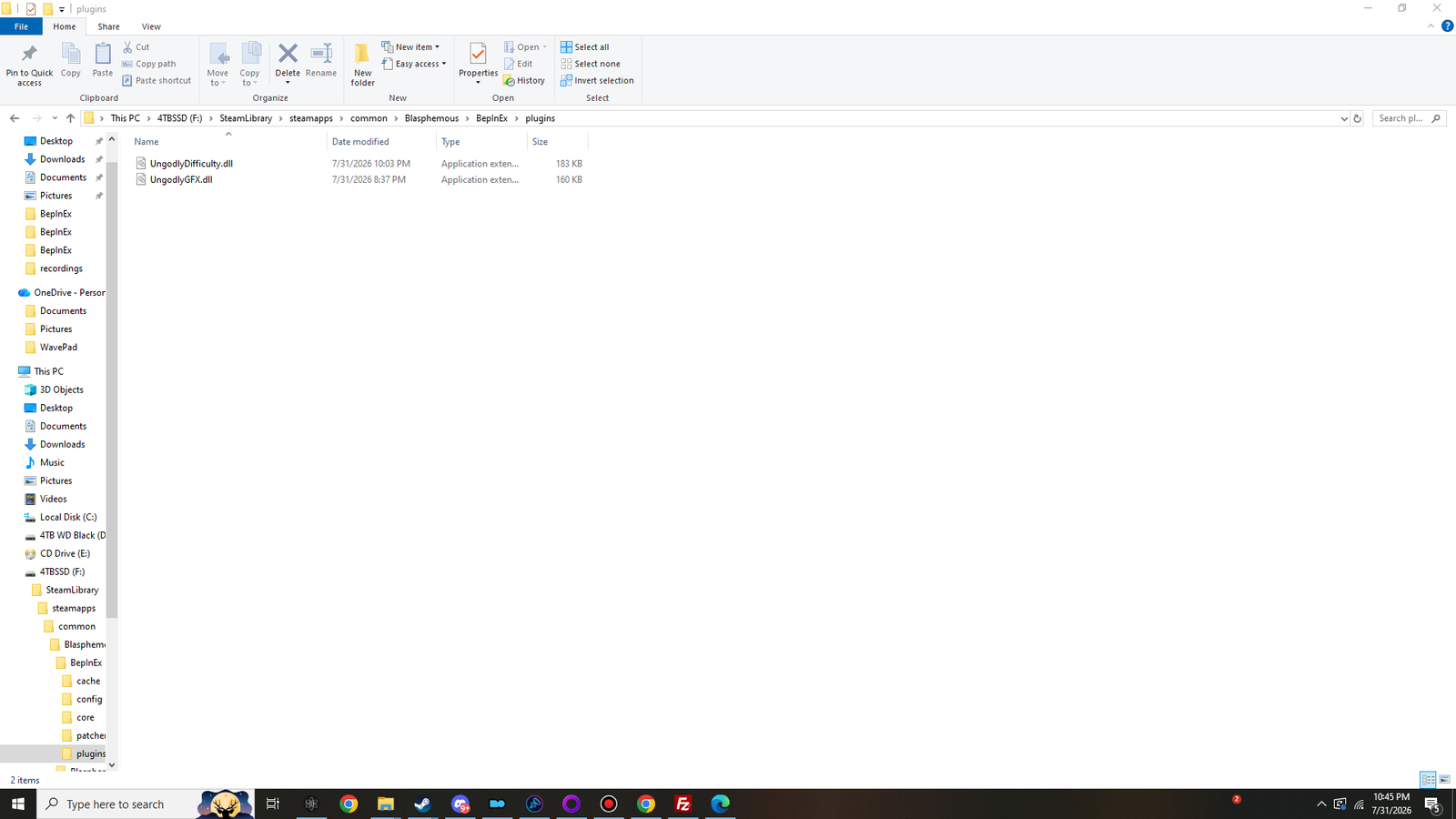
Check the file sizes
Explorer should read 196 KB for UngodlyDifficulty.dll and 160 KB for
UngodlyGFX.dll. A DLL that reads 1 KB is a browser error page that got saved with the
wrong name — download it again.
The screenshot below was taken on Ungodly Difficulty 1.1.1
and shows 183 KB. Version 1.2.0 is the larger file.
Click to view at full size ↗Both plugins installed. Loose DLLs directly in plugins — no sub-folder, no rename. Sizes read 183 KB and 160 KB. Shown at 1280×720 — the original is 1920×1080.The complete layout, just before the modded launch
Blasphemous/├── Blasphemous.exe├── winhttp.dll from station 03├── doorstop_config.ini└── BepInEx/ ├── core/ ├── patchers/ ├── cache/ ├── config/ the .cfg files land here on next launch │ └── BepInEx.cfg ├── plugins/ │ ├── UngodlyGFX.dll you copy this │ └── UngodlyDifficulty.dll and this └── LogOutput.log
■ you copy this in ■ the game writes this itself ■ already there, leave it alone
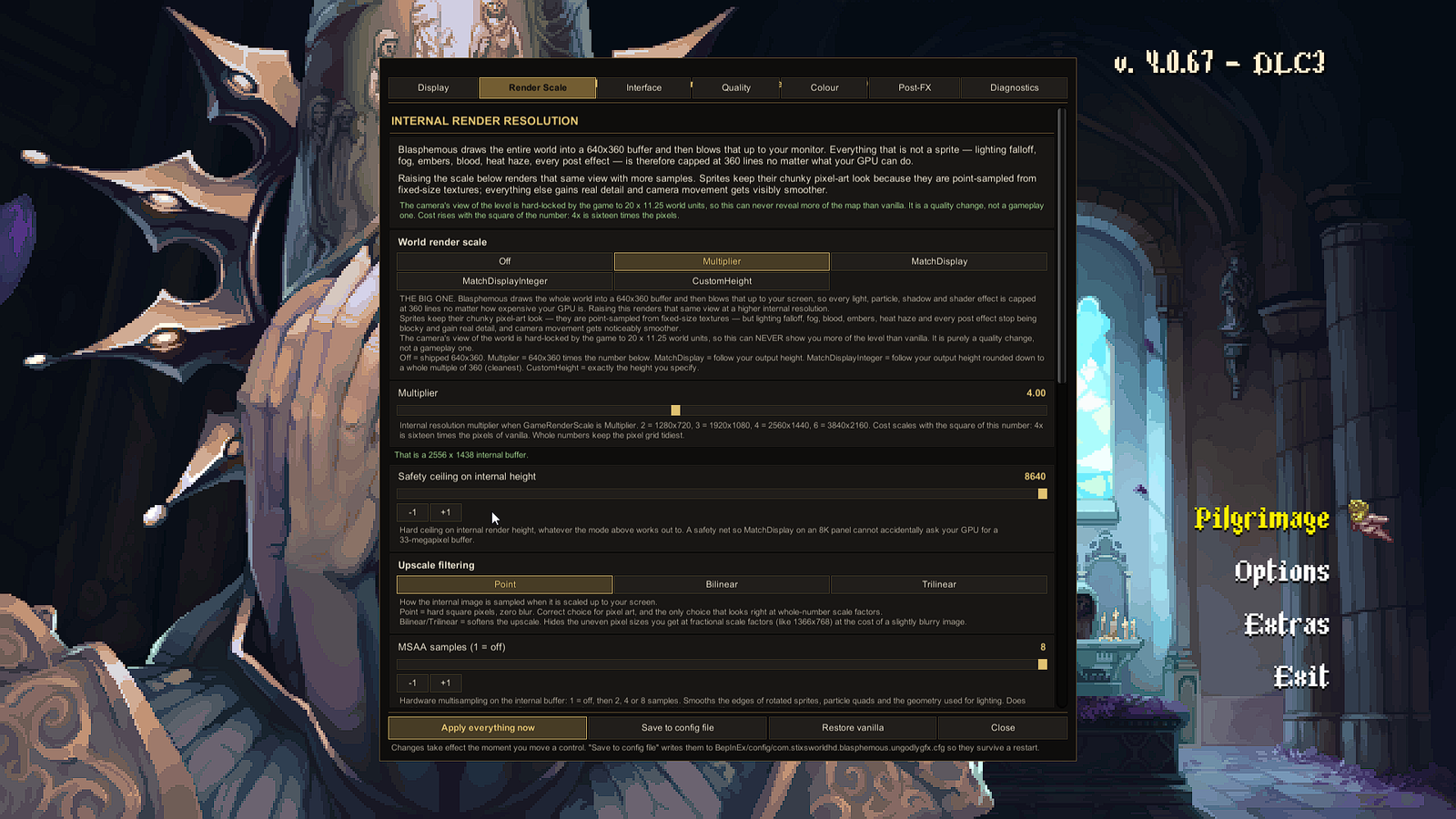
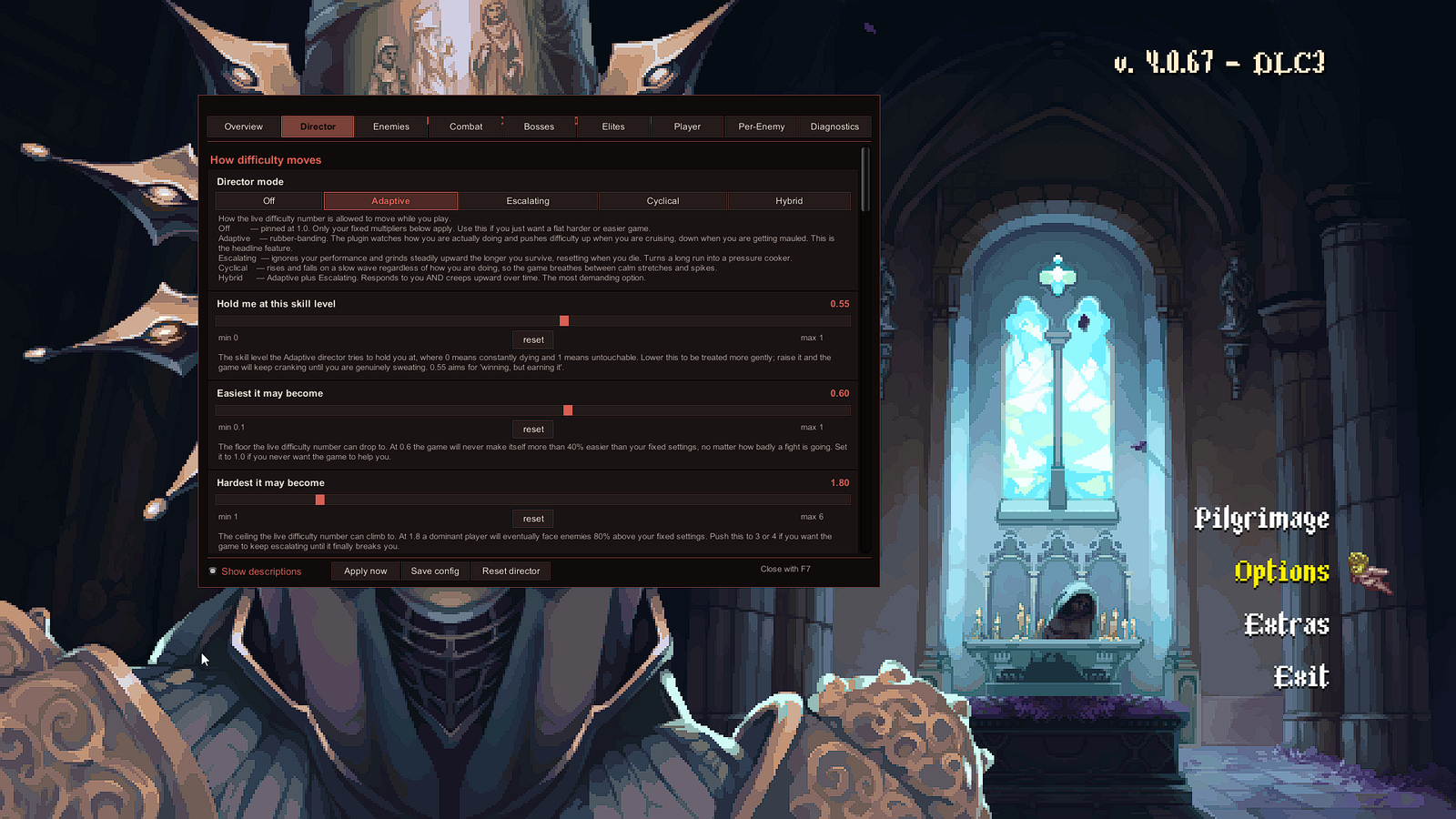
The mouse pointer appears with either panel and disappears again when you close it. The game pauses while a panel is
open. Both panels can be closed with their own hotkey or with the Close button at the bottom.
Click to view at full size ↗Ungodly GFX on F10, Render Scale tab. The multiplier is at 4.00 and the panel reports the internal buffer it just built. Gold palette, seven tabs. Shown at 1280×720 — the original is 1920×1080.Click to view at full size ↗Ungodly Difficulty on F7, Director tab. Crimson palette, nine tabs, and every control carries its own plain-English description underneath. Shown at 1280×720 — the original is 1920×1080.
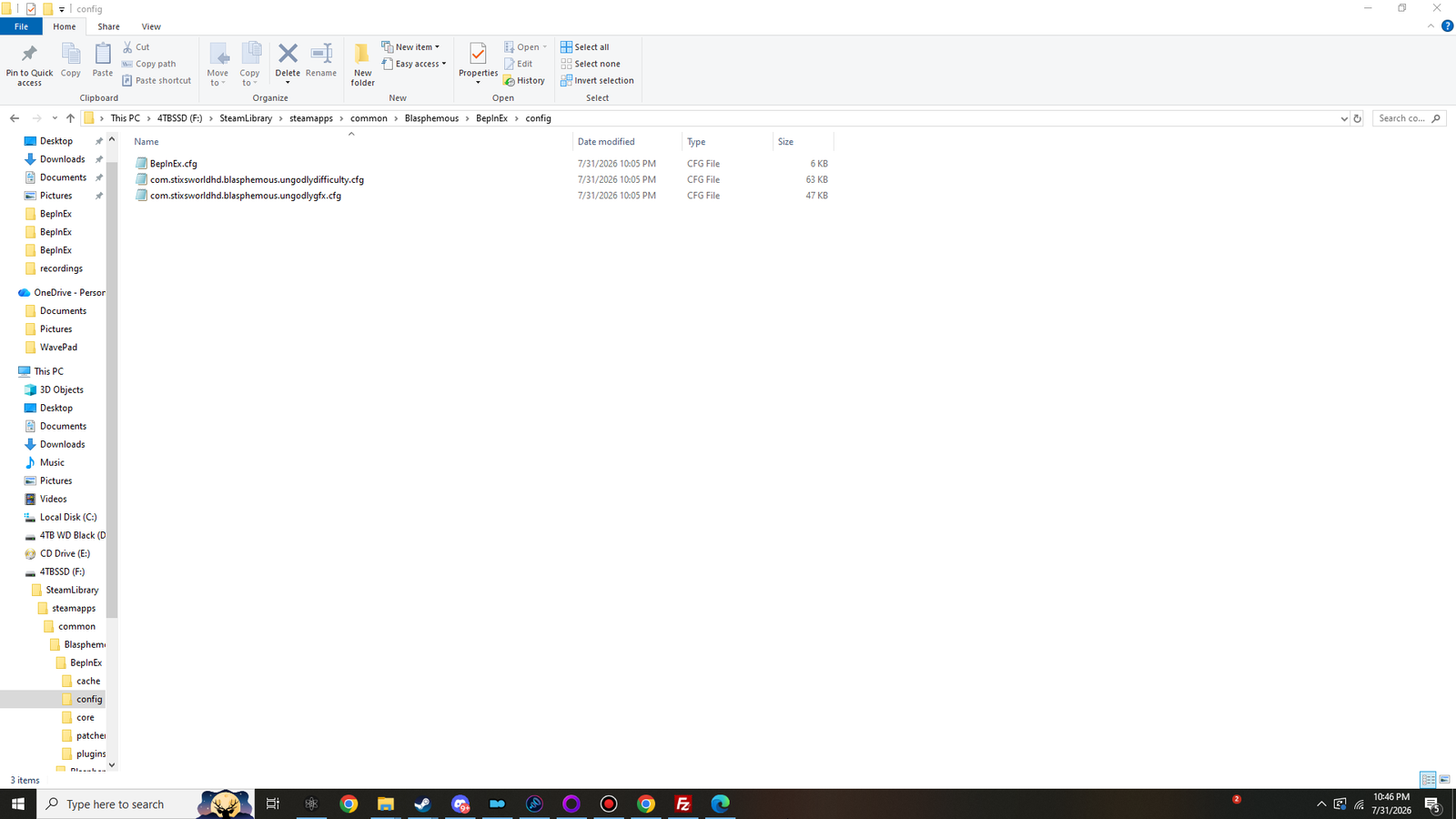
Now close the game and look in BepInEx\config. Two files you did not create are sitting there:
Click to view at full size ↗The config folder after the first modded launch. Both plugin configuration files have written themselves — 63 KB and 47 KB of documented settings you never had to create. Shown at 1280×720 — the original is 1920×1080.
Twenty-one sections. Every enemy, boss, elite, projectile, player, director and continuity dial, each with its range and an explanation.
com.stixsworldhd.blasphemous.ungodlygfx.cfg
47 KB
117 settings across eight sections: general, display, render scale, UI scaling, quality, colour, post-processing, overlay.
BepInEx.cfg
6 KB
BepInEx’s own settings. Written at station 03, not by either plugin.
⁂One more folder turns up later
The first time you save the game, Ungodly Difficulty 1.2.0 creates
BepInEx\config\UngodlyDifficulty\ and writes one small text file per save slot, recording where the
difficulty had got to so your next session resumes there. It is a sidecar — nothing is written into your save
data. How that works.
✦That is the install finished
Both panels open, both configuration files exist. Everything from here is either confirming it
(station 05) or deciding what you actually want the game to do
(station 06 and station 07).
2 plugins to load — BepInEx found both DLLs. If it says 0, they are in
the wrong folder. If it says 1, one of them is.
A banner line for each — the plugin loaded, its constructor ran, and its version is what you think
it is. The version in the banner is the authority, not the filename.
Chainloader ready — the load phase completed without an exception taking anything down
with it.
⚠A plugin listed but no panel
If the banner is there but F7 or F10 does nothing, the plugin
loaded and something else is intercepting the key — usually recording software or an overlay bound to the same
function key. Station 08 covers it.
They are completely independent. Copy in one DLL, leave the other out, and everything works — there is no shared
library between them and no load-order requirement in either direction.
If you do run both, they were built to coexist. Every point where two IMGUI plugins normally collide was separated
deliberately:
Point of contact
Ungodly GFX
Ungodly Difficulty
Plugin GUID
…ungodlygfx
…ungodlydifficulty
Panel hotkey
F10
F7
Readout hotkey
F11
F8
Window ID
0x5C1F5
0x5D1FF7
Input blocker
UngodlyGFX
UngodlyDifficulty
Palette
gold
crimson
Config file
…ungodlygfx.cfg
…ungodlydifficulty.cfg
Pausing is cooperative too: each plugin only ever unfreezes time that it froze itself. If the graphics panel already
had the game stopped when you opened the difficulty panel, closing the difficulty panel will not hand control back to
a running game.